PromptSmart+
- 4.3
- Rating
- 100.00K
- Installs
- Free
- Price

 Analysis by App-foxy
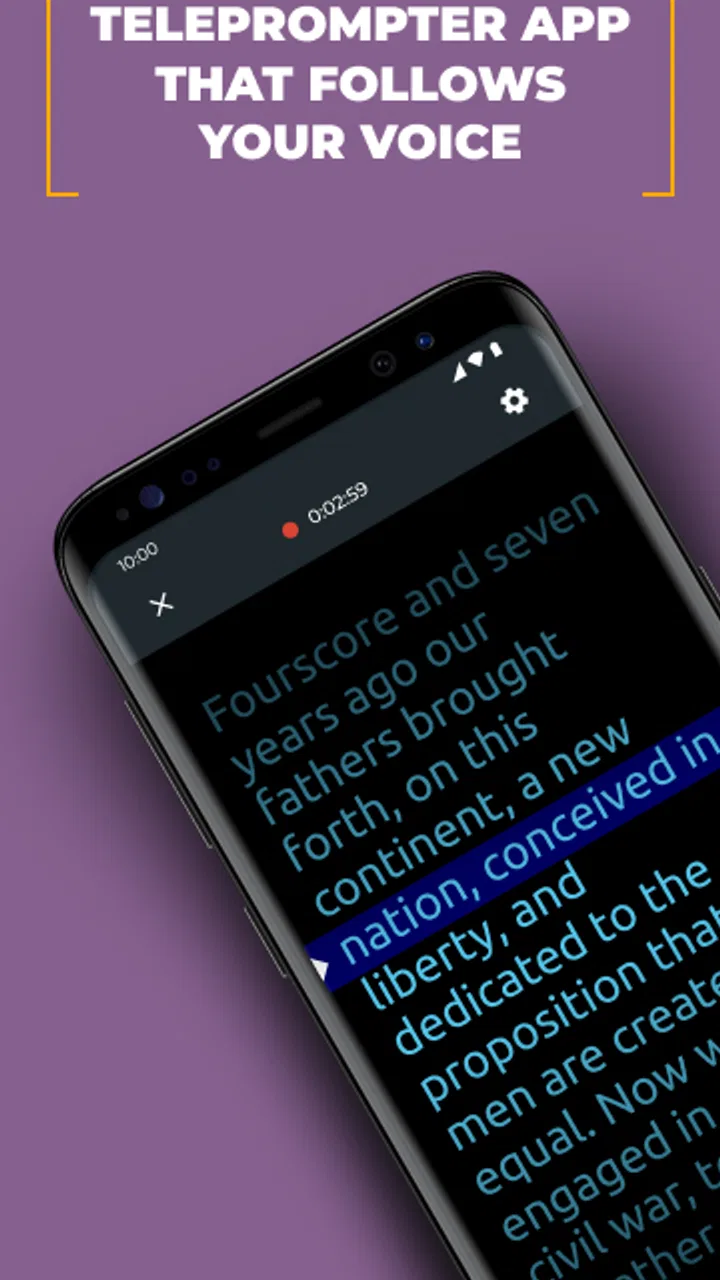
Speaking naturally on camera is harder than it looks. I can know exactly what I want to say, press record, and still lose my place after the opening sentence. PromptSmart+ is built for that specific problem: it combines a scrolling script with speech recognition so the words move along as I speak. After using it as a video-prompting tool, I see it less as a complete video editor and more as a practical way to make recording sessions calmer, more organized, and less dependent on memorization.
The app comes from Belleau Technologies LLC and sits in the video players and editors category. It is free to install, with optional purchases ranging from $1.99 to $59.99 per item. Its store summary focuses on recording better videos with a speech-recognition teleprompter, and that description is a fair starting point, although the real value depends on how well a teleprompter fits your personal recording habits.
What to decide before choosing a teleprompter
The first question is not whether PromptSmart+ has a teleprompter. It does. The more useful question is whether you want a script that follows your voice or a script that moves at a fixed speed. Those are very different experiences. A timed scroller asks you to match its pace, while speech recognition attempts to follow your delivery. For presenters who pause, restart a sentence, or speak faster when nervous, that difference can make a recording feel much less mechanical.
You May Also Like

 Blood Strike: 2.5 Anniversary
Blood Strike’s Loadouts Turn Every Drop Into a Tactical Gamble
A close look at Blood Strike’s custom loadouts: how fast access to signature weapons reshapes its battle royale rhythm, rewards preparation, and narrows the gap between fights.

 Pandora - Music & Podcasts
Pandora’s Music Is Easy to Start, but Harder to Recover
Pandora’s strength is its low-effort path from a seed to a station. Its weak spot is how much confidence it asks you to place in connection, setup, and quiet recovery.

 8 Ball Pool
 Is Built on Rivalries, Rematches, and Routine
A close look at the rivalries, rematches, shared routines, and unanswered safety questions that turn a quick pool match into a persistent mobile community.

 Samsung Music
’s Quiet Strength Is Playing What You Already Own
Its reach comes less from spectacle than from dependable access to a personal library. That simplicity is both the app’s strongest retention engine and its ceiling.

 AccuWeather: Weather Radar
AccuWeather Review: A Quick, Clear Forecast for Everyday Decisions
For everyday plans, the best forecast is the one you can understand quickly. AccuWeather makes rain timing, radar, and local conditions easy to act on, with a few trade-offs.

 Hill Climb Racing
Why Hill Climb Racing Still Turns Crashes Into One More Run
A tiny car, a bumpy hill and one more upgrade: Hill Climb Racing keeps resurfacing because its simple chaos makes every near-miss feel personal.
More From Our News Desk
View All News


I would also decide how much editing you do before and after recording. If your main goal is to look at the camera and deliver a prepared explanation in one take, this app addresses the central difficulty directly. If you want advanced cuts, layered effects, color work, audio mixing, or a polished social-media edit, you will probably need a separate editor. PromptSmart+ is useful at the capture stage, not a replacement for every tool in the broader video workflow.
Another practical consideration is your filming setup. A teleprompter works best when the screen is close enough to the camera that your eye movement is not obvious. If you hold a phone far to one side or place the script on a second display at an angle, viewers may notice that you are reading. The application can help with delivery, but it cannot correct poor camera placement. I found that a simple, centered setup matters almost as much as the scrolling technology.
The app is rated for Everyone, which makes it suitable for a broad range of users, including students, teachers, small business owners, and people making personal videos. It requires an operating system version 9 or later. That requirement is worth checking before installing, especially if you are using an older device that still handles ordinary recording apps comfortably.
How the voice-following approach feels in practice
A conventional teleprompter usually depends on a speed setting. You estimate how quickly you will speak, start the scroll, and try to stay aligned with the text. That method is predictable, but it becomes awkward when you need to think, emphasize a point, or repeat a phrase. PromptSmart+ takes a different approach by using speech recognition to advance through the script as your words are detected.
In my experience, this makes the app most helpful for prepared but conversational content. I can write a short outline in full sentences, speak in my normal rhythm, and avoid the exaggerated delivery that often happens when someone chases a moving block of text. It is particularly useful when the script contains details that are easy to forget, such as names, instructions, sequences, or a precise introduction.
That does not mean the experience is completely automatic. Speech recognition depends on clear delivery and a usable recording environment. Background noise, very quiet speech, heavy accents, long pauses, or frequent improvisation can make any voice-following teleprompter less comfortable. I recommend treating the script as a guide rather than assuming the app will rescue every unscripted sentence.
A useful habit is to write for speaking rather than reading. Short paragraphs, natural punctuation, and visible breaks give the recognition system and the presenter a cleaner path through the material. Long blocks of formal prose may look fine in a document but can be tiring to deliver aloud. The best results come from preparing a script that sounds like something I would actually say to another person.
The recording workflow I would use
For a short instructional video, I would prepare the script in sections instead of creating one uninterrupted wall of text. I would place the key message near the beginning, leave space for a natural pause, and keep supporting details in the order I intend to explain them. Before recording the final take, I would read through the script once without worrying about camera performance. That rehearsal exposes awkward wording before the pressure of recording begins.
On the actual take, I would keep my eyes near the lens and speak at a comfortable pace. If I make a mistake, I would pause briefly, repeat the sentence, and continue rather than immediately starting over. This is one of the less obvious benefits of a voice-following script: it can make recovery feel more manageable than trying to catch up with a fixed scroll. I would still expect to trim mistakes later if the finished video needs to look polished.
For a presentation with several points, I would use verbal transitions as anchors. Phrases such as “the next thing to check” or “now let’s look at the result” help me maintain the structure while also making the delivery easier to follow. This is not a special button or hidden mode; it is a workflow advantage that appears when the script and recognition system are used together thoughtfully.
I would also keep a backup copy of important scripts outside the app. That is sensible for any writing or recording tool, particularly when a script represents a class presentation, client explanation, or planned announcement. The app can be central to the recording session without becoming the only place where the text exists.
Where PromptSmart+ is strongest
The clearest strength is the way it addresses the gap between memorizing a script and reading one. I do not have to commit every sentence to memory, but I also do not have to follow a scroll that assumes I will speak at one constant speed. That makes it a strong fit for people who want a more relaxed delivery while still keeping control over the message.
It is especially well suited to solo creators who record directly to a phone or tablet and do not have another person calling out prompts. A teacher recording a lesson, a freelancer explaining a service, or a student practicing a presentation can all benefit from having the wording visible without repeatedly looking down at notes. The app is also useful for recurring formats, where a presenter records introductions, demonstrations, or updates on a regular basis.
Another advantage is confidence. When I know the next point is available in front of me, I can spend more attention on tone, eye contact, and explanation. That matters for educational or instructional videos, where sounding clear and approachable is often more important than producing a dramatic performance. The tool does not make the content better by itself, but it reduces one source of avoidable hesitation.
The app has also attracted a meaningful user base, with a 4.3 average from around 2.2 thousand ratings and over 100 thousand installs. Those figures suggest that the concept is not a niche experiment, although popularity alone should not decide whether it suits your setup. I would still judge it by the kind of videos you make and by how comfortable you are speaking from a prepared script.
The current version is 4.0.3, and the application first appeared on February 12, 2018. That history gives it the feel of an established tool rather than a brand-new recording idea. For me, the important point is not its age but the fact that the product has remained focused on a recognizable use case: helping a speaker stay with a script while recording.
Where a different category may fit better
PromptSmart+ is not automatically the best choice for every creator. If you already speak confidently from bullet points, a simple notes app may be faster and less distracting. Notes are often enough for informal updates, quick vertical clips, or videos where spontaneity matters more than exact wording. Adding a teleprompter can sometimes make a casual message feel over-rehearsed.
A traditional scrolling teleprompter may be preferable when timing is critical. If a presenter must match a live event, cue, slide change, or co-host, a fixed pace can be easier to coordinate than speech recognition. The same applies when the script contains unusual terms that may be pronounced inconsistently. In those situations, predictable movement may matter more than the ability to pause naturally.
A dedicated camera app or full video editor is a better fit when visual control is the priority. Someone who needs sophisticated framing, manual exposure, multi-camera work, detailed audio adjustments, or extensive post-production should not expect a teleprompter-focused application to cover the entire job. I would use PromptSmart+ to improve delivery, then move the footage into the editing environment that matches the project.
It may also be a poor match for highly improvised content. Interviews, reaction videos, live commentary, and spontaneous vlogs often develop in directions that a fixed script cannot anticipate. In those cases, a few talking points placed beside the camera may preserve more natural interaction. The voice-following design is most valuable when there is a real script to follow, even if that script leaves room for a personal tone.
What the free model means for a real workflow
The application is free, which makes it easy to test without committing immediately. That matters because teleprompter comfort is personal. Some people quickly adapt to reading near the lens; others find any on-screen text distracting. I would record a short private practice clip before deciding whether it belongs in my regular setup.
Optional in-app purchases range from $1.99 to $59.99 per item. Since the available purchase can affect the long-term cost, I would check the purchase screen carefully and decide whether the free experience already covers my needs. A person recording occasional school assignments may have no reason to spend more, while a professional creator who uses the tool frequently may view an upgrade differently.
The cost of switching is not only financial. Moving from fixed-speed scrolling to voice-following prompting requires a small change in preparation. I have to write scripts that sound natural, speak clearly enough for recognition, and learn how to recover when I depart from the wording. That learning curve is modest, but it is real. The payoff is strongest when I record often enough for the new rhythm to become familiar.
There is also a content cost to consider. Reading every word can flatten a presentation if the script is too formal. I would avoid writing complete paragraphs when a short spoken outline would do, especially for personal or conversational videos. The app works best when it supports my voice rather than replacing it with a rigid reading exercise.
Everyday situations where it earns its place
Imagine recording a short video for a local service business before opening for the day. The owner wants to explain a new appointment process, mention a few important details, and finish with a clear invitation. Without a prompt, it is easy to forget one detail or repeat the opening several times. With a prepared script that follows the owner’s speech, the recording can stay organized while still sounding like a direct explanation to a customer.
For a student, the app can be useful during presentation practice. Instead of memorizing a full speech, the student can rehearse eye contact, pacing, and transitions while keeping the wording available. I would not use it as a substitute for understanding the subject, but it can reveal where a presentation sounds unnatural or where the speaker relies too heavily on written sentences.
For a teacher, it can support a series of short lessons. A script keeps terminology consistent from one recording to the next, while voice-following movement allows pauses for emphasis. The teacher still needs to review the final video for mistakes, but the recording stage becomes less dependent on repeated retakes.
For a creator who publishes regularly, the strongest benefit may be repeatability. A consistent opening, explanation structure, or product demonstration can be prepared once and adapted for new episodes. The trade-off is that repeated formats can become stiff if the presenter follows the text too literally. I would update the wording and allow small natural variations rather than treating each script as something that must be recited perfectly.
My recommendation after weighing the trade-offs
I recommend PromptSmart+ to anyone who wants help delivering prepared video content but dislikes the unnatural pace of a conventional teleprompter. Its speech-recognition approach is the reason to choose it. It gives a solo presenter a better chance of maintaining eye contact and recovering from ordinary pauses without losing the structure of the script.
I would start with a short script, a quiet room, and a camera positioned close to the text. Speak naturally, but not so softly or quickly that recognition has to guess every word. Once that workflow feels reliable, move on to longer presentations and recurring video formats. This gradual approach is more useful than immediately testing it with an important recording.
I would skip it if I mainly make spontaneous clips, need a complete professional editing suite, or prefer bullet points over word-for-word guidance. A notes app, fixed-speed teleprompter, or dedicated editor may be more appropriate depending on the job. PromptSmart+ is not a universal video solution, and treating it as one would create the wrong expectations.
For the right user, however, it solves a very specific and frustrating problem. It helps turn a prepared script into a more natural spoken performance, without asking me to memorize everything or chase text at an arbitrary speed. Its real value is the balance between structure and conversational delivery. If that balance matches the way you record, the free entry point makes it worth trying, and the focused design gives it a clear place in a practical Android or iOS video workflow.
FAQs for PromptSmart+
01What is PromptSmart+ and what is it used for?
PromptSmart+ is a teleprompter application designed to help users deliver speeches, presentations, lessons, videos, and other spoken content more confidently. Instead of manually scrolling through a script, the app can follow your voice and adjust the text as you speak. This makes it useful for creators, public speakers, teachers, presenters, and anyone who wants to maintain eye contact while reading prepared material.
02How does PromptSmart+ voice tracking work?
The app uses voice recognition to follow your progress through a script while you speak. When your delivery slows down, pauses, or changes pace, the teleprompter is designed to adapt rather than scrolling at a fixed speed. In my experience, clear pronunciation and a quiet environment are important for the best results. Background noise, very fast speech, or frequent improvisation may cause the text to lose synchronization.
03Can I import and customize scripts in PromptSmart+?
PromptSmart+ supports working with prepared scripts and provides customization options intended to make reading more comfortable. Depending on the version and platform, users may be able to import text, adjust font size, change scrolling behavior, and modify the display for different recording setups. Before downloading, check the current feature list because supported file formats, cloud options, and editing tools can vary between Android, iOS, and subscription plans.
04Is PromptSmart+ suitable for recording videos and live presentations?
Yes, PromptSmart+ can be useful for both video production and live speaking situations. It helps presenters keep their attention near the camera or audience instead of constantly looking down at notes. However, it should be tested before an important event, particularly when using voice tracking. Lighting, microphone quality, device placement, and the distance between you and the screen can all affect how naturally and reliably the app performs.
05Does PromptSmart+ require a subscription or an internet connection?
PromptSmart+ may offer a combination of free access, paid features, or subscription-based plans, depending on the current app version and platform. Some functions may work offline, while voice recognition, synchronization, cloud storage, or other advanced tools could require additional permissions or connectivity. Review the pricing details, trial conditions, renewal policy, and privacy information in the official app store before starting a subscription or uploading personal scripts.
Pros
- Scrolling speed adapts to your speaking pace.
- Useful for speeches
- presentations
- lessons
- and video scripts.
- Supports importing scripts for faster preparation.
- Voice tracking helps maintain eye contact with the audience.
- Cloud-based options can simplify access across devices.
Cons
- Voice tracking may struggle with accents or noisy environments.
- Requires practice to sound natural while following the scrolling text.
- Some advanced features may require a paid subscription.
- Long scripts can be harder to organize and navigate.
- Continuous microphone use may increase battery consumption.

PromptSmart+
Gallery